Skip to content
Infraware.dev

How it works

Autonomy grows at the speed of the record.

Virgil does the work and proposes every change, your engineers sign it, and the record they build decides what may run on its own.

The loop

Four steps, the same every time.

Autonomous up to the approval. Nothing crosses it without a person, and every crossing leaves one record.

  1. Step 1

    Propose

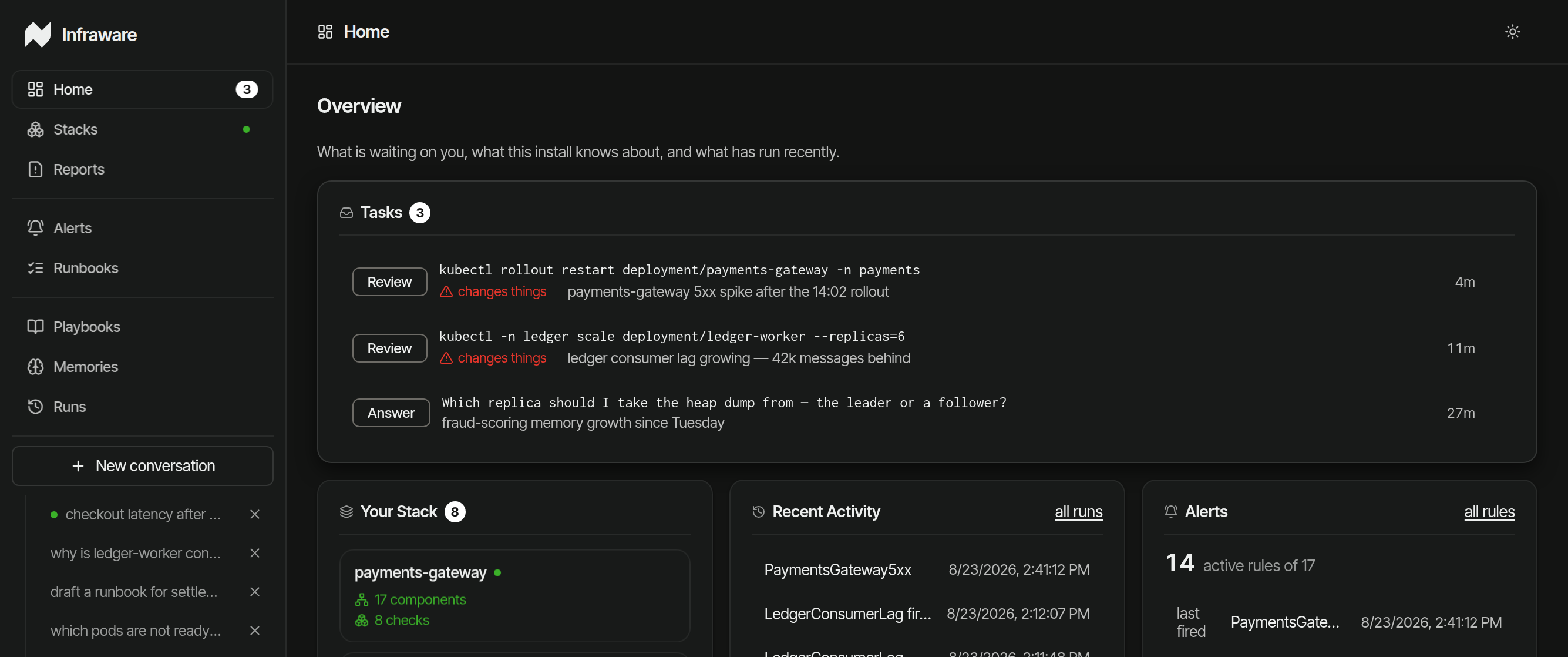
    Virgil works the alert, the question or the runbook on its own, read-only, and writes a brief with one proposed change.

  2. Step 2

    Sign

    A named engineer reads the brief and approves the change, or refuses it. Nothing runs before that.

  3. Step 3

    Run

    The approved command runs once, as a scoped Kubernetes job under your RBAC. The agent never holds the write credentials.

  4. Step 4

    Record

    One entry lands in your logs: who approved what, on what evidence, and what ran.

Step 1: Propose

Read‑only work, ending in one proposal.

Virgil takes the alert the moment it fires, a question from your engineer, or a runbook, and works it on its own. Every command it runs is checked against a fixed allowlist of read-only operations; a command that would write is rejected at parse, recorded, and never executed.

It ends in a brief: the root cause, the evidence behind it with its sources, and one proposed change. Proposed, not executed. Your engineer reviews a finished case instead of twenty dashboards.

Investigating · PaymentsGateway5xx · payments namespace

run a41c evidence 314:08:57
  1. 14:08:22 kubectl get pods -n payments -l app=payments-gateway 5/5 running · 0 restarts · readiness green allowlisted · read-only
  2. 14:08:27 kubectl rollout history deployment/payments-gateway -n payments revision 47 applied 14:02:34 · previous revision ran clean for 9 days allowlisted · read-only
  3. 14:08:34 kubectl logs deploy/payments-gateway -n payments --since=10m worker pool saturated from 14:06:58 · every thread waiting on pool acquire allowlisted · read-only
  4. 14:08:41 kubectl delete pod payments-gateway-7d4fc9-x2m4 -n payments rejected at parse · mutative action · requires your approval · nothing executed · on the record blocked on the record
  5. 14:08:47 kubectl describe deployment payments-gateway -n payments maxUnavailable=0 · old pool connections pinned by live traffic allowlisted · read-only

Root cause identified

Report ready

Revision 47 wedged the gateway’s workers: readiness stayed green while every thread blocked on the old pool.

Example run: a 5xx alert on payments-gateway after a rollout, a pod delete blocked at parse.

Incident report

Alert Completed

PaymentsGateway5xx, payments namespace · fired 14:08:11 · run a41c

Root cause
Rollout to revision 47 at 14:02 wedged the gateway’s workers: readiness stayed green while every request thread blocked on the old connection pool. Traffic kept routing; 5xx began six minutes later.
Evidence
  • rollout historyrevision 47 applied 14:02:34; previous revision ran clean for 9 days
  • pod status0 restarts, readiness green throughout: not a crash, a wedge
  • gateway logsworker pool saturated from 14:06:58; every thread waiting on pool acquire
Proposed
kubectl rollout restart deployment/payments-gateway -n payments

proposed, not executed. Mutative actions require your approval.

Ask Virgil about this Open full report
Example: the brief for the same run, with the root cause, the evidence and one proposed change.

How read-only is enforced

Step 2: Sign

Nothing changes production without a name on it.

A named engineer reads the brief and approves the command, or refuses it. The approval shows the reason, the exact command and the identity it will run as before anyone signs.

Command approval

Write Approved
Why
payments-gateway 5xx after the 14:02 rollout, a restart clears the wedged workers.
Command
kubectl rollout restart deployment/payments-gateway -n payments
Executes as
Kubernetes Job · serviceaccount svc-frontend-rwmutative action, requires your approval
Approved by
Alex Riverajob disp-4c21 · Succeeded
Example: the approval, with the command, the identity it runs as, and who signed.

Watch a signature live in the demo

Step 3: Run

Once, as a scoped job, under your RBAC.

The approved command runs once, as a Kubernetes job under a write service account bounded by your RBAC, never under the agent’s read identity. The agent itself never holds write credentials.

Kubernetes Job

job disp-4c21 Succeeded
Command
kubectl rollout restart deployment/payments-gateway -n payments
Runs as
payments / svc-frontend-rw · bounded by your RBAC
Started by
cmd-dispatch · after the signature
Runs
once · exit 0
Example: the approved restart, run once as a job.

The identity model

Step 4: Record

One record per change, written by the dispatcher.

The component that executed the command writes the entry, not the agent narrating its own work: approver, resolved principal, command, and outcome.

It lands in your log storage, next to your security logs, and stays there.

Audit entry

cmd-dispatch 14:13:20
Approver
alex.rivera@example.com · via console
Resolved principal
payments / svc-frontend-rw
Command
kubectl rollout restart deployment/payments-gateway -n payments
Outcome
Succeeded · job disp-4c21 · exit 0
Example: the entry the change leaves in your logs.

What the record contains

Over time

Day one it knows Kubernetes. Month one it knows you.

From each run, Virgil drafts the runbook. Your engineers edit it, own it, or delete it, and the next investigation starts from your procedures.

payments-gateway: wedged workers after rollout

Draft

Drafted by Virgil · from run a41c · 14:22

  1. 1Confirm the 5xx rate on payments-gateway is still elevated and correlated with the latest rollout.
  2. 2Check rollout history: expect a fresh revision minutes before the first errors.
  3. 3Drain the checkout queue. Then restart the gateway to clear the wedged workers.
    kubectl rollout restart deployment/payments-gateway -n payments

    mutative action, requires your approval at run time

  4. 4Watch readiness and the 5xx rate until both run clean for ten minutes.
  5. 5If the restart does not clear it within five minutes, roll back to revision 46 and page the on-call.
Saved · last edited by Alex Rivera 14:26 · draft v2
Example: a runbook drafted from the run, edited by your team.

Guarantees

Three things that hold on every run.

Autonomy, earned

Autonomy is earned, not toggled.

When your record shows the same fix approved identically, again and again, sign it once as policy: a routine. Same identity binding, same audit line, the grant traced to its signer. Revoke the signature and the pause returns.

Standing signature

routine #4
Command
kubectl rollout restart deployment/payments-gateway -n payments
Evidence
approved identically 12× · 2026-06-14 to 2026-08-02 · zero rejections
Signed as policy
a.rivera2026-08-05
Every run since
same identity binding · same audit line · grant traced to its signer
Example: what a rung looks like when it is earned. Not a toggle, a receipt.

Category

An AI SRE, with the signature built in.

Virgil does the AI SRE’s job: it investigates every alert, day or night, and hands your engineer the root cause and a proposed fix. Then it keeps going: questions, runbooks and routine changes pass the same signature and land in the same record, and that record decides what may run on its own.

How Infraware compares with a typical AI SRE, question by question
The question A typical AI SREInfraware
Does it investigate every alert? Yes Yes, on its own and read-only
What work does it take on? Incidents Alerts, questions, runbooks and changes
What does it optimize? Time to diagnosis Time to diagnosis, and accountability per change
Where does autonomy come from? Model confidence settings Your own record of signed changes
What does the audit answer? What the agent did Who approved what, on what evidence, and what ran
Where does it run? Often in the vendor’s cloud Inside your boundary, with no vendor channel
What is the end state? A faster engineer on shift Faster diagnosis, and a governed pathway any agent can run through

The long version: what an AI SRE has to answer for

How to start

Watch the loop close on a real cluster.

Twenty-five minutes, live: we break a cluster with rotelle and every step above happens in front of you. Then a ten-week pilot, scoped to your infrastructure.